Build online exercises. Follow student progress before your next session.

Gamified language paths in minutes. Your students practise on their own; you see time spent, retries and wrong answers.

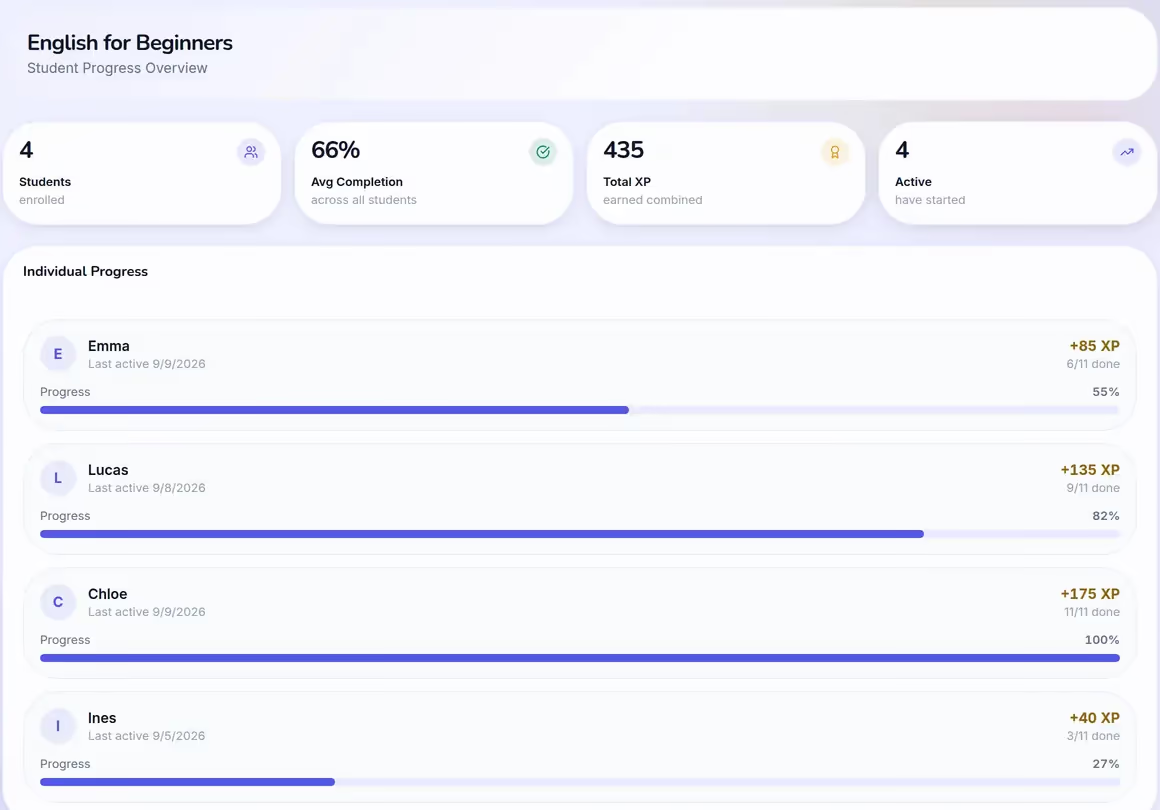
In a browser window, the teacher's progress overview for a path: 4 students enrolled, 66% average completion, 435 XP earned combined, and an Individual Progress list with Emma at 55%, Lucas at 82%, Chloe at 100% and Ines at 27%.
On a phone, the student's paths screen greeting Emma with a 12-day streak and 145 XP.

Teacher · desktop Build the path once.

Student · phone They practise on their own.

One hour a week with you.
Your student spends the other 167 on their own.

The hour you teach is the part you're great at. What decides whether it sticks happens in the other 167, where you can't see it.

  • "So… did you practise?"

    A score says six out of ten. It can't say whether they wrestled for twenty minutes or clicked through in ninety seconds.

  • Making exercises takes longer than it should?

    Retype the PDF into a quiz tool, fight the formatting, paste the link into WhatsApp. Twenty minutes of admin for five minutes of practice, every week.

  • They got it wrong. You'll never know how, or for how long.

    Your student picked I have ate over I ate, and sat on it for four minutes. The answer and the hesitation both tell you something. A red cross tells you neither.

Teacher and Me closes all three. Here's how

Everything a language tutor needs.
Nothing you don't.

Three focused tools that cover the full between-session loop: create → assign → review.

Build exercises in seconds, not hours

Seven exercise types, from grammar checks to pronunciation. Pick one, fill in your content, save. Group exercises into modules, modules into a path.

The Learning Paths list in the teacher app: three paths, English for Beginners first with 11 exercises for 4 students.
The editor for English for Beginners: Lesson 1 holds a multiple-choice exercise worth 10 XP and a type-sentence exercise worth 20 XP, with Add Exercise below them.
The Create Exercise form in the teacher app, open on the exercise-type picker: Multiple Choice, Type Sentence, True/False, Match the Pairs, Reconstruct Sentence, Complete Sentence and Pronounce Sentence.

Teacher · building a path

Students stay motivated on their own

XP, streaks and visible progress keep students going between sessions without you chasing them. It feels like a game, not homework.

The student paths screen greeting Emma with a 12-day streak and 145 XP.
A match-the-pairs exercise: four French phrases on the left, their English meanings on the right, waiting to be paired.
A lesson-complete card awarding 30 of 30 XP with 100% accuracy in 35 seconds.
A student profile with a three-week streak and a weekly activity chart.

Student · on their phone

Walk into every session prepared

One screen shows who finished, who stalled, who never started. Open a student for the three signals that matter: time spent, retries and which wrong answers they chose. Thirty seconds, and you know what to teach next.

In a browser window, the progress overview for a path: 4 students enrolled, 66% average completion, 435 XP earned combined, and an Individual Progress list with Emma at 55%, Lucas at 82%, Chloe at 100% and Ines at 27%.
On a phone, the Progress Overview dashboard: 6 students, 3 active paths, 61% average completion, 18 exercises, and a completion-by-path chart.

Teacher · desktop and phone

From session to session in four steps

  1. Build a path

    Create a learning path for the topic you covered. Add modules and exercises. Takes under five minutes.

  2. Assign it

    Send it in one click while the topic is fresh. Free for them too, opens on any phone, no app store.

  3. Student plays

    Your student works through the gamified path independently. XP and streaks keep them motivated without you.

  4. You arrive prepared

    Before your next session, open the analytics view. See exactly where they struggled, and walk in ready.

Your data stays yours.
No ads, no resale, no catch.

Teacher and Me is built and hosted in Europe, fully GDPR-compliant, and free to use. It runs on contributions from tutors who choose to chip in. Not on ads, and never on selling your data.

  • Built & hosted in Europe

    Made by an independent European team, with your data kept on EU servers (our analytics run on PostHog's EU cloud). It never leaves Europe.

  • GDPR-compliant by design

    Our analytics are cookieless, so there's no tracking and no consent banner nagging your students. We collect the minimum we need and stop there.

  • No ads, ever

    No banners, no pop-ups, no sponsored anything. Just a clean, focused tool for you and your students, the way teaching software should be.

  • We never sell your data

    Your students, their answers, and the paths you build are yours alone. We don't sell, rent, or share your data with advertisers or third parties.

  • 0% commission

    We're your tool, not your middleman. Unlike tutoring marketplaces, we never take a cut of what you earn from your own students.

  • Free to use

    Free, no credit card required. Start today and keep everything you build. There's no trial clock and no surprise paywall waiting.

Made with ♥ for teaching.

All the kinds of exercise you can create

The Create Exercise form with Multiple Choice picked from the exercise-type grid.
You write it

Multiple Choice

A multiple-choice exercise on a student phone: "How do you politely ask for water in English?" over four answers to choose from.
They answer it
The Create Exercise form with Type Sentence picked from the exercise-type grid.
You write it

Type Sentence

A type-sentence exercise on a student phone, with the answer being typed into the field.
They answer it
The Create Exercise form with True/False picked from the exercise-type grid.
You write it

True/False

A true/false exercise on a student phone, asking whether a translation is correct.
They answer it
The Create Exercise form with Match the Pairs picked from the exercise-type grid.
You write it

Match the Pairs

A match-the-pairs exercise on a student phone: French phrases on the left waiting to be joined to their English meanings on the right.
They answer it
The Create Exercise form with Reconstruct Sentence picked from the exercise-type grid.
You write it

Reconstruct Sentence

A reconstruct-sentence exercise on a student phone: a sentence being rebuilt word by word from a bank of tiles.
They answer it
The Create Exercise form with Complete Sentence picked from the exercise-type grid.
You write it

Complete Sentence

A complete-the-sentence exercise on a student phone: two gaps in one sentence, each typed into directly.
They answer it
The Create Exercise form with Pronounce Sentence picked from the exercise-type grid.
You write it

Pronounce Sentence

A pronunciation exercise on a student phone: the sentence to read aloud above a record button.
They answer it
Free to start · No credit card

Your next session starts here.

Walk into it knowing exactly where to focus your time.

Free. No paid plan, no card, no trial clock.

  • EU-hosted
  • GDPR-compliant
  • No ads
  • No data selling
  • 0% commission

Free for teaching, for everyone.

Teacher and Me is a tool for teachers, not a startup chasing growth. The plan is simple: keep it free for everyone who teaches. If it saves you time, you can chip in toward hosting; the maintainer takes nothing.

Support Teacher and Me

Via Ko-fi · one-off or monthly · the app stays free either way